Upsert Azure DevOps work items into Dataverse
At a glance
Upsert a row needs a GUID for its Row ID. Build one from the work item ID with concat('00000000-0000-0000-0000-', formatNumber(AdoId, '000000000000')): the same ID always makes the same GUID, so every run updates the existing row instead of adding a duplicate.
concat('00000000-0000-0000-0000-', formatNumber(item()?['AdoId'], '000000000000'))- Level
- Intermediate
- Applies to
- Power Automate cloud flows · Microsoft Dataverse connector (Premium)
The challenge
A scheduled flow copies Azure DevOps work items into a Dataverse staging table called Work Items. The table already holds 20 work items from earlier runs, and every run brings back a mix: work items it has never seen, work items that haven’t changed, and work items that have.
Add a new row would duplicate everything it has already seen. Upsert a row is the right action — it updates the row if it exists and adds it if it doesn’t — but it finds that row by Row ID, and Row ID must be a GUID. A work item ID like 483452 isn’t one.
Two of the rows already in the table:
| Row ID | ADO ID | Title |
|---|---|---|
00000000-0000-0000-0000-000000483452 |
483452 | Fix login flow |
00000000-0000-0000-0000-000000514002 |
514002 | Fix billing report |
The next run brings back three work items: one new, one exactly as it already is in the table, and one whose title has changed.
[ { "AdoId": 100000, "Title": "Add dark mode toggle" }, { "AdoId": 483452, "Title": "Fix login flow" }, { "AdoId": 514002, "Title": "Resolve billing report discrepancy" }]After the run the table should hold 21 rows: 100000 added, 483452 left as it was, and 514002 carrying its new title — with no duplicates.
Before you start
Every action below can be pasted in directly: add the action, open its ··· menu › Peek code, and paste. Power Automate keeps the action’s position (and runAfter) from wherever you dropped it, so add each one in order and only paste over its type/inputs.
- Add a Compose action named
Work items, then peek-code-paste this. It stands in for your Azure DevOps action’s output:
{ "type": "Compose", "inputs": [ { "AdoId": 100000, "Title": "Add dark mode toggle" }, { "AdoId": 483452, "Title": "Fix login flow" }, { "AdoId": 514002, "Title": "Resolve billing report discrepancy" } ]}- A Dataverse table named Work Items with two text columns: ADO ID and Title. Its primary key column, shown in the table designer as Work Items, holds the row’s GUID.
- The Dataverse connector is Premium, so the flow needs a Power Automate Premium license (or a license that includes Dataverse).
- In a real sync, point the steps at your Azure DevOps action’s output instead of the Compose, and use its own field names in place of
AdoIdandTitle.
The solution
One Select builds a GUID for every work item. An Apply to each then upserts each row with that GUID as its Row ID.
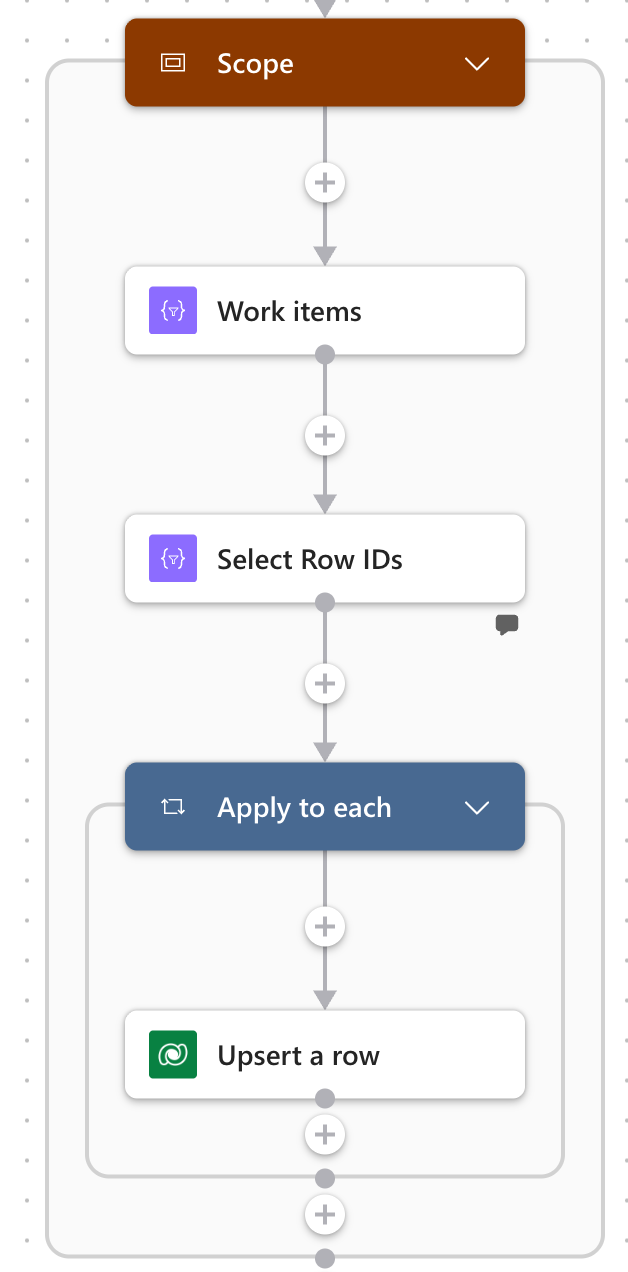
- Work items: the Compose holding the incoming work items.
- Select Row IDs builds a stable GUID for each work item.
- Apply to each runs once per work item.
- Upsert a row writes it, using that GUID as the Row ID.
-
Build a stable GUID for each work item.
Add a Select action named
Select Row IDs, then peek-code-paste this:Select Row IDs › Peek code {"type": "Select","inputs": {"from": "@outputs('Work_items')","select": {"RowId": "@concat('00000000-0000-0000-0000-', formatNumber(item()?['AdoId'], '000000000000'))","Title": "@item()?['Title']","AdoId": "@string(item()?['AdoId'])"}}}formatNumber(..., '000000000000')pads the ID to 12 digits, andstring()turns the ID into text for the ADO ID column:Select Row IDs › Outputs [{ "RowId": "00000000-0000-0000-0000-000000100000", "Title": "Add dark mode toggle", "AdoId": "100000" },{ "RowId": "00000000-0000-0000-0000-000000483452", "Title": "Fix login flow", "AdoId": "483452" },{ "RowId": "00000000-0000-0000-0000-000000514002", "Title": "Resolve billing report discrepancy", "AdoId": "514002" }]The second and third Row IDs match rows already in the table. The first matches nothing, because 100000 is new.
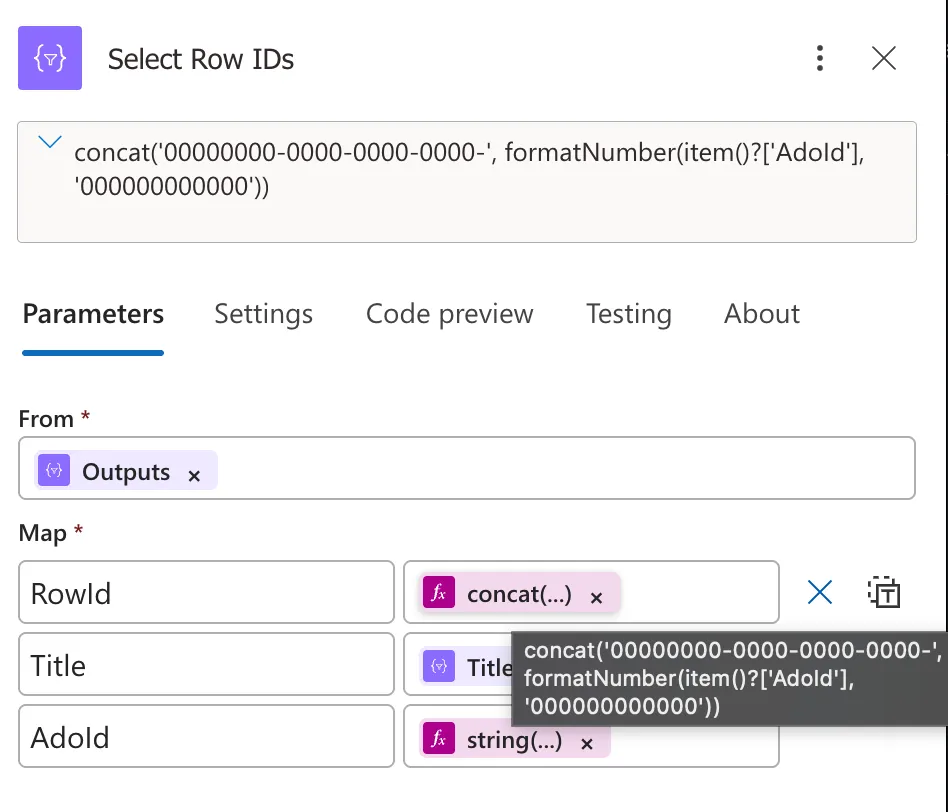
- From: the Work items output.
- RowId: concat('00000000-0000-0000-0000-', formatNumber(item()?['AdoId'], '000000000000')).
- Title and AdoId fill the two Dataverse columns.
-
Upsert each row.
Add an Apply to each over the Select output,
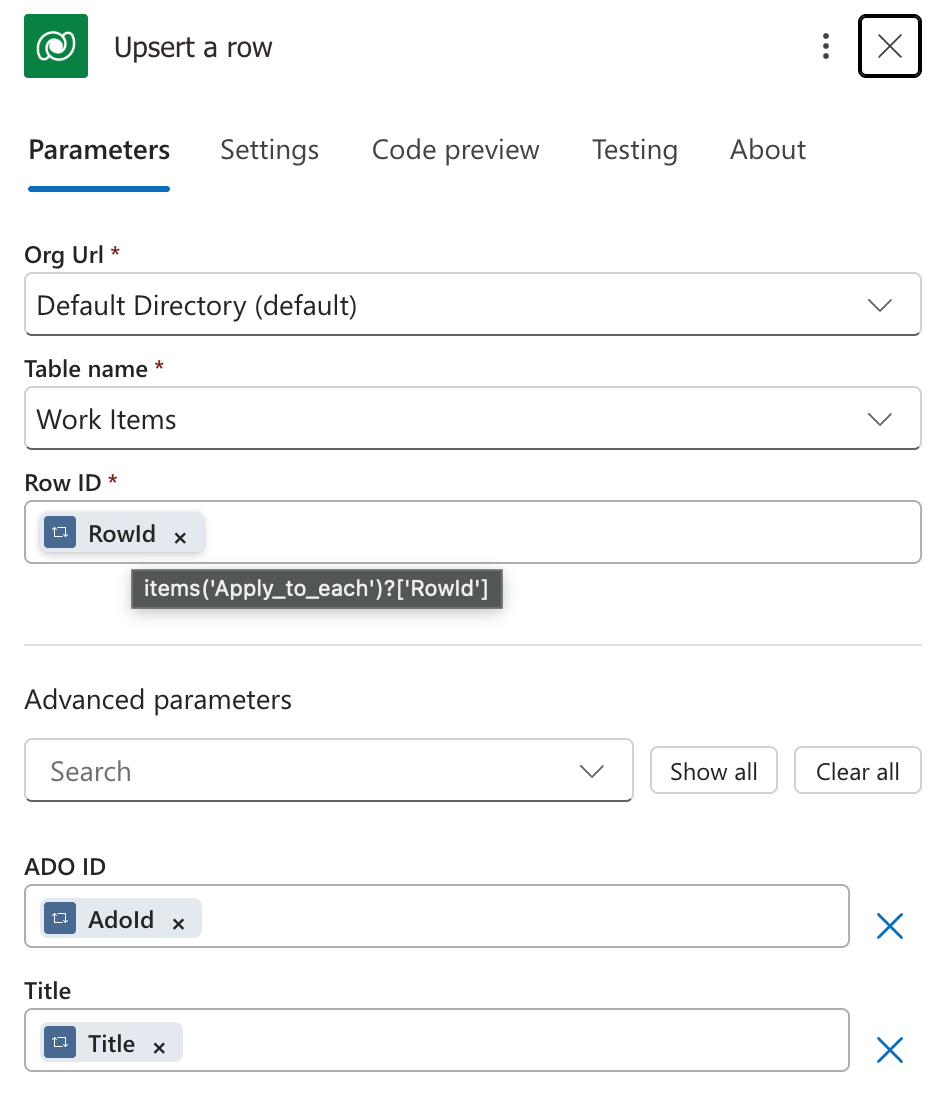
body('Select_Row_IDs'). Inside it, add Upsert a row from the Microsoft Dataverse connector and set:Field Value Org Url your environment Table name Work Items Row ID items('Apply_to_each')?['RowId']ADO ID items('Apply_to_each')?['AdoId']Title items('Apply_to_each')?['Title']ADO ID and Title don’t appear until you open Advanced parameters and choose Show all — only Org Url, Table name and Row ID show by default.
In Peek code these columns appear under their logical names rather than the labels you see here:
csv_ado_idand, because Title is the table’s primary name column,csv_name. Check yours in the table’s Columns list if they don’t line up.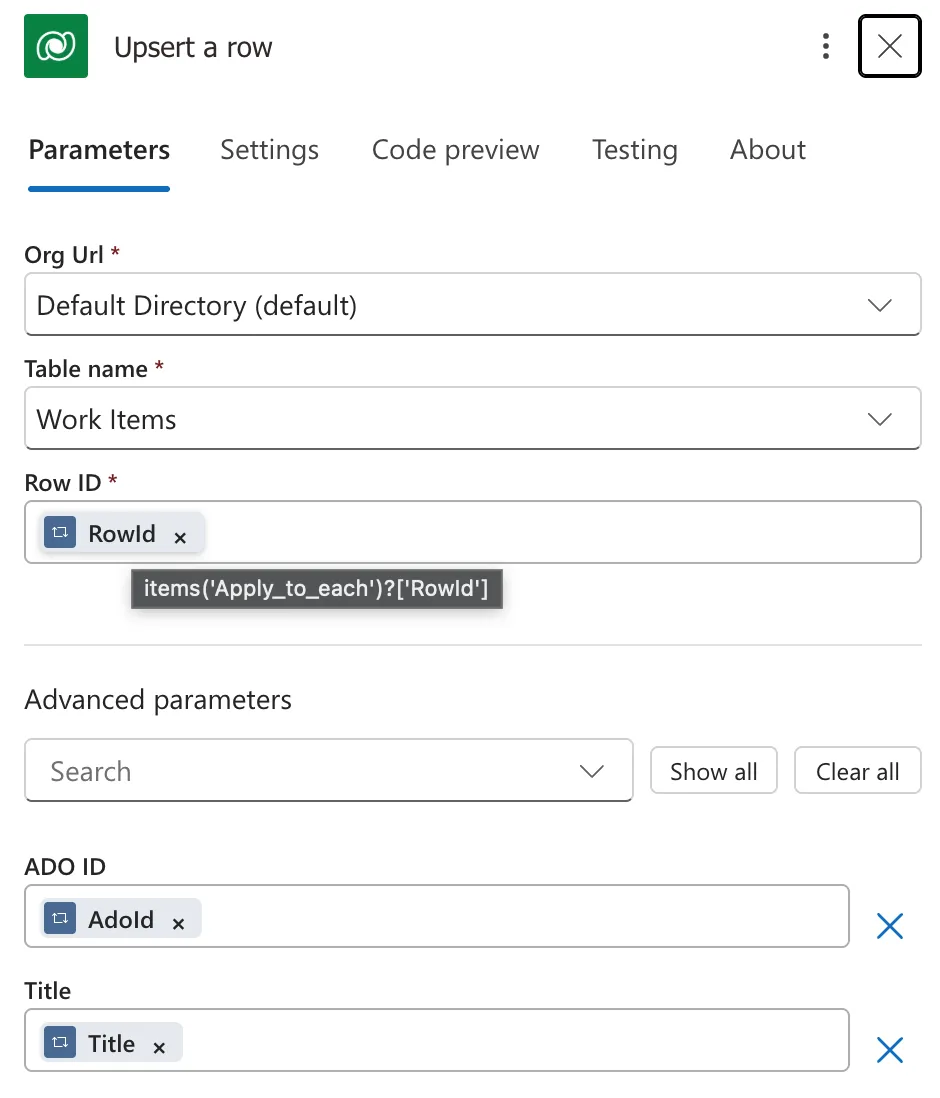
- Table name: Work Items.
- Row ID: items('Apply_to_each')?['RowId'].
- Show all reveals the table’s own columns.
- ADO ID and Title come from the same Select item.
-
Run it and compare the table.
Look at the Work Items table, run the flow, then look again:
ADO ID Before the run Incoming title After the run What Upsert a row did 100000 (no row) Add dark mode toggle Add dark mode toggle Added a row 483452 Fix login flow Fix login flow Fix login flow Updated it with the same values 514002 Fix billing report Resolve billing report discrepancy Resolve billing report discrepancy Updated the title The table goes from 20 rows to 21: one new work item, and no duplicates of the other two. The Work Items column holds each row’s GUID, and every one ends in its own ADO ID.

- Each row ID ends in that row’s ADO ID.
- 514002: “Fix billing report”.
Before the run: 514002 is still titled “Fix billing report”, and there is no row for 100000. 
- 100000: a new row, created by the run.
- 514002 now reads “Resolve billing report discrepancy”.
- 483452 was created at 2:21 and modified at 4:32 — rewritten even though nothing changed.
After the run: one row added, two updated, nothing duplicated.


How it works
- Upsert a row looks for a row whose primary key equals the Row ID. If it finds one, it updates it; if not, it adds a new row with that exact GUID as its primary key.
formatNumber(AdoId, '000000000000')turns483452into000000483452. The zeros are placeholders, so the result is always 12 digits.concat('00000000-0000-0000-0000-', ...)puts those 12 digits in the last group of an otherwise all-zero GUID:00000000-0000-0000-0000-000000483452.- The same input always gives the same output. Work item 483452 produces the same GUID on every run, so the existing row is updated instead of duplicated — whether its title changed (514002) or not (483452).
- A new ID produces a GUID no row has yet, so Upsert a row creates the row with that GUID (100000).
Variations
- More than one source: give each source its own first group, e.g.
00000001-0000-0000-0000-for one Azure DevOps organization and00000002-0000-0000-0000-for another. The same work item ID from two organizations then lands in two different rows. - The ID arrives as text: wrap it in
int()first —formatNumber(int(item()?['AdoId']), '000000000000')— becauseformatNumberneeds a number. - Your Azure DevOps action’s output: swap
outputs('Work_items')for that action’s output, anditem()?['AdoId']/item()?['Title']for its own ID and title fields.
Gotchas
- Unchanged rows are still written. Upsert a row doesn’t compare values. In the screenshot above, 483452 came back with the title it already had, and its Modified On still jumped to 4:32 PM — so anything that fires on update (audit history, flows triggered by a modified row) fires too. To skip unchanged rows, filter them out before the Apply to each.
- Don’t use
guid(). It’s random, so it never matches an existing row and every run adds duplicates. - Pick the pattern once. Rows already in the table keep the GUIDs they were created with. Switching to a new pattern later makes every work item a new row, so reload the table if you change it.
- Mind the throttling limit. The Dataverse connector allows 6,000 calls per connection every 5 minutes, and each upsert is one call. For large loads, set the Apply to each concurrency with that limit in mind.
- The ID has to fit in 12 digits. Azure DevOps work item IDs are 32-bit integers — at most 10 digits — so they always fit.
FAQ
Why not use guid() for the Row ID?
guid() returns a new random value every time it runs. The Row ID would never match an existing row, so every run would add another copy of every work item.
Is a GUID made only of zeros and digits valid?
Yes. A GUID is 32 hexadecimal characters in groups of 8-4-4-4-12, and the digits 0 to 9 are valid hexadecimal characters. Microsoft documents supplying your own primary key GUID on upsert when an external system generates it.
How do I handle work items deleted in Azure DevOps?
Upsert never deletes. A work item removed at the source simply stops arriving, and its Dataverse row stays exactly as it was. A staging table usually handles this with a soft delete: add an IsActive column, set it to Yes on every upsert, then after the loop set it to No for any row whose ADO ID is missing from this run. A Select and a Filter array with "does not contain" find those rows, and because nothing is destroyed, one bad run at the source is recoverable.
Can I use an alternate key instead of a GUID?
The Dataverse Web API can upsert by alternate key, but the Upsert a row action's Row ID field asks for the row's GUID. A GUID built from the work item ID works with the standard action and needs no alternate key on the table.
Comments
Loading comments…